
(A2) Create a New Task or Event (Enhanced)
Learn how to create, update, and manage tasks and events in the SLS Planner, and attach resources or assignments for easy in-class access.
(A2) Create a New Task or Event (Enhanced)
Class Events improve the way teachers use SLS for in-class lessons by allowing them to attach SLS resources and assignments to events in the Planner. This will help students quickly access their learning materials and easily toggle between SLS and physical resources in class.
Create a New Task
There are three ways to create a New Task, from:
Planner
Select the Tasks tab and click New Task.
Module Plan
Within a Module, click the Module Plan icon and select the Add Task to Planner icon .
Section Cover
Click Add Task to Planner.
On the New Task subpage, fill in the following details:
Title - The event title will be pre-filled for you as "Untitled". Change the title to one that is concise and relevant.
Description - You can include details of the task here.
Complete By - You can indicate the deadline of your task here.
Attachments - You may attach assignments, resources or goals (only for Learning Progress page).
Click Create to proceed.
Update a Task
On the Planner page, select the Tasks tab, followed by the Ongoing tab to view all your tasks.
Click the Task card to view the task details.
To mark a task as complete, select Mark as Complete.
To edit or delete a task, click the Overflow (3-dot icon) and select Edit or Delete. You are not able to retrieve deleted tasks.
Creating a New Event
There are three ways to add a New Event:
Click Actions + New Event from the Planner page,
Click Actions + New Event from the Planner tab within a Class Group,
Scroll to your desired time on the Planner page and click at the time slot to create a new event at that time.
When adding a new event from the Planner page, select which Planner the new event should be created for (includes Personal Planner). You can do so from the Planner dropdown list.
Note: When a new event is added from the Planner tab within a Class Group, the new event created will be for the selected Class Group.
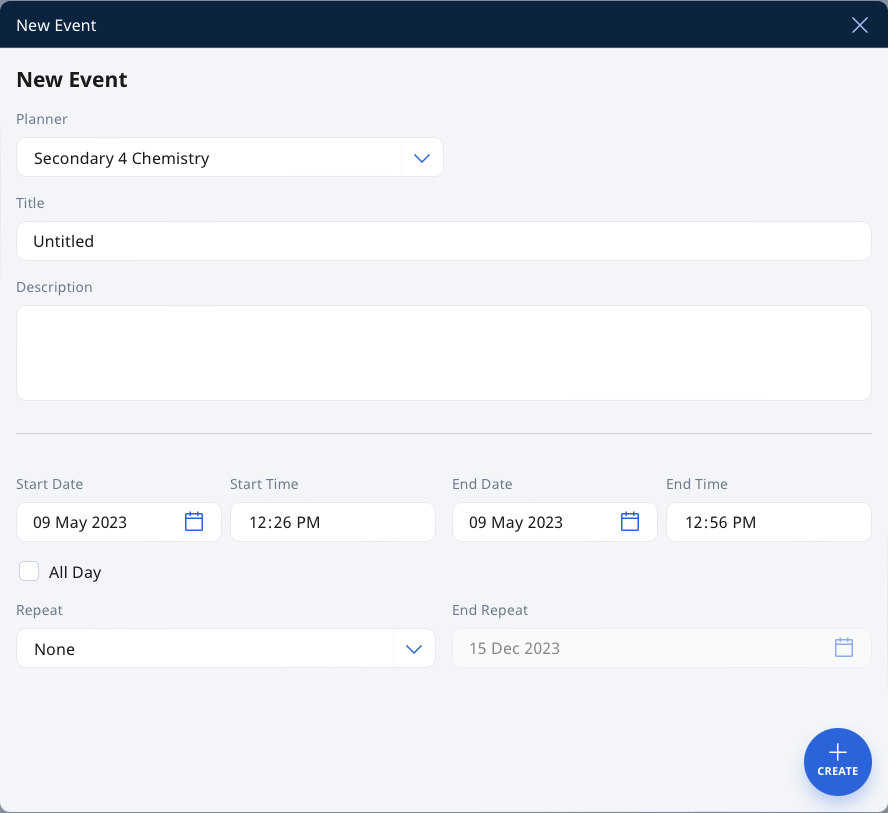
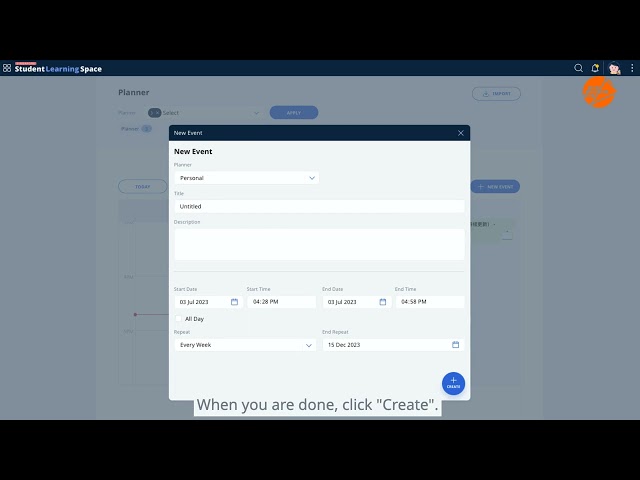
On the New Event subpage, fill in the following details:
Planner - Click the dropdown list to select which planner you want to create the New Event in. By default, the Personal Planner will be selected.
When creating a new event from the Planner tab within a Class Group, the Class Group Planner will be default Planner.
Title - The event title will be pre-filled for you as "Untitled". Change the Title to one that is concise and relevant.
Description - You can include details of the event here.
Date & Time - You can select how often the event repeats, and the end date for the repeat.
Note: The End Repeat field will be greyed out if None or Custom are chosen for Repeat.
Repeat - You can select how often the event repeats.
Note: The End Repeat box will be greyed out if None or Custom are chosen for Repeat.
Click Create to proceed.
For a Class Group Event, clicking the View Planner icon will redirect you to the Planner tab within the Class Group.
Add Attachments to Task or Event
You can attach assignments or resources from My Drive, Library and Starred Resources to a task or event in your Class Group and/or Personal Planner.
From the Task or Event subpage, select either the Assignments or Resources dropdown and click Attach.
For Assignments, you can:
Search for assignments based on title, assignment status, and/or Class Group. Click Apply to proceed.
For Resources, you can:
Select From My Drive, From Library, or From Starred Resources under Attach Resources.
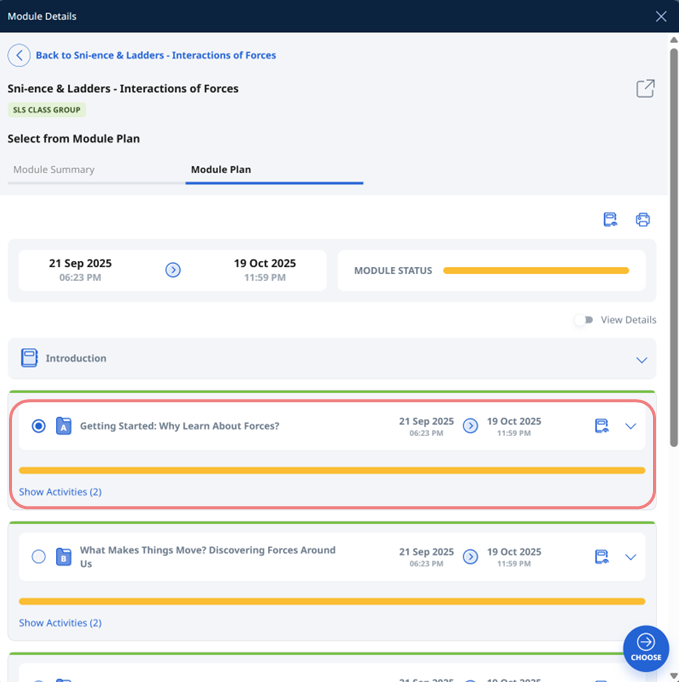
From the Attach Assignment or Attach Resources subpage, you can select the section or the whole module (without sections) you wish to attach.
Edit, Duplicate, or Delete Events
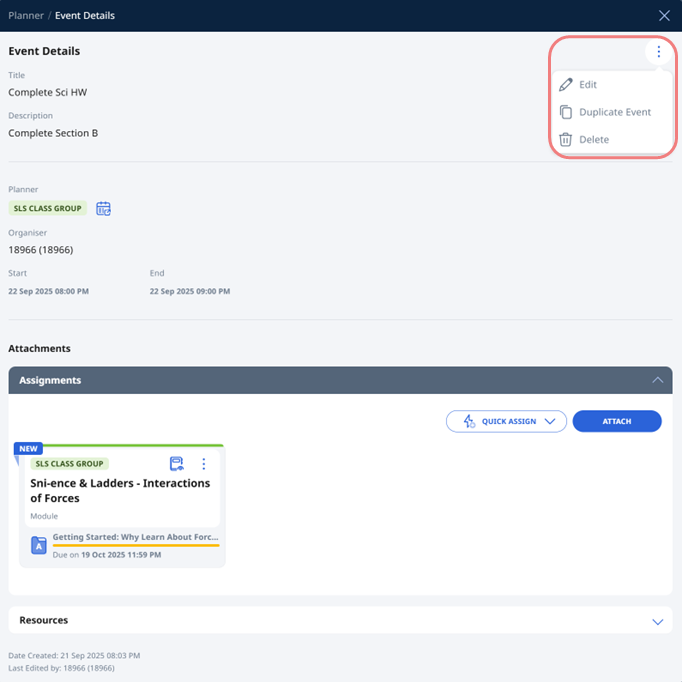
Click the Event card to view the event details.
Click the Overflow (3-dot icon) and select Edit, Duplicate Event or Delete.
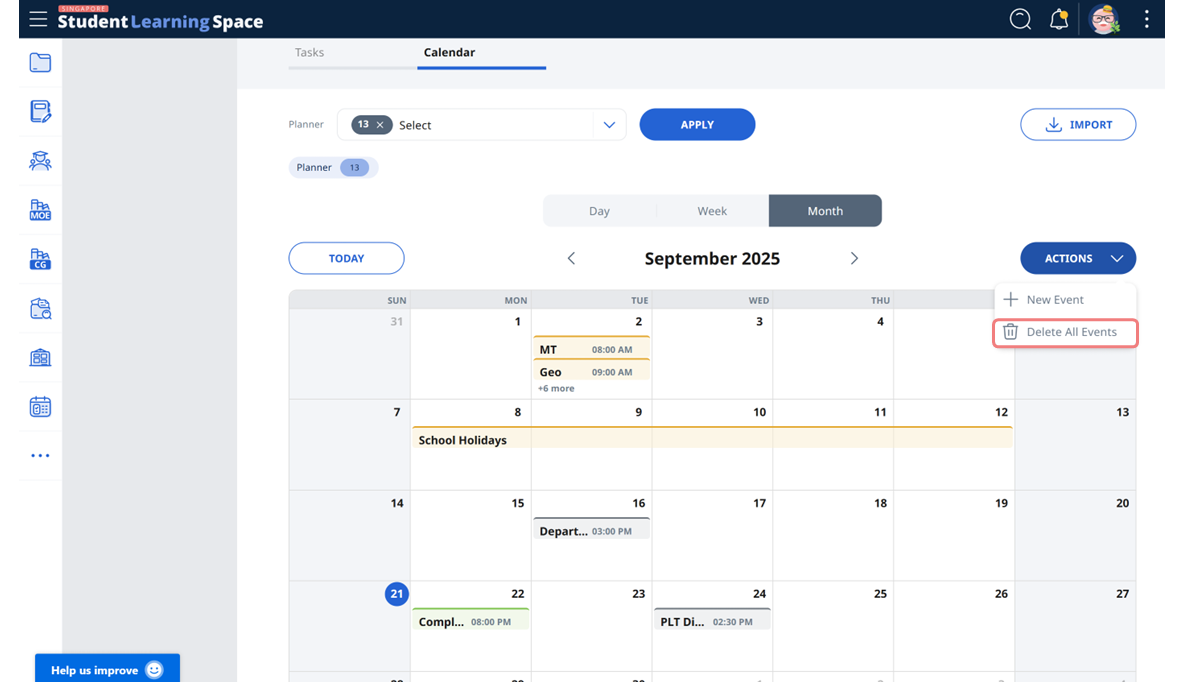
To delete all events, there are 2 ways:
Click Actions + Delete All Events from the Planner page,
Click Actions + Delete All Events from the Planner tab within a Class Group.
Video Tutorial
The "Lessons" in My Drive mentioned in the video have been relabelled to "Modules".