(B1,1) Annotate Text within Activities
Annotate text in your assignments and self-study resources by highlighting key phrases and adding notes, equations, or recordings. Use the Annotation Drawer to view, edit, or delete your notes.
(B1,1) Annotate Text within Activities
Add Annotation to Text within an Activity
When you are working on an assignment or a Self-Study resource, you can add annotations to the text. This feature can be used to make notes specific to a phrase or sentence. For example, you can insert a definition or explanation for a term you just learnt. You can also highlight text without adding a Note to it.
From within a module, highlight the text that you want to annotate.
Select a colour for the highlight.
A textbox will appear. You may choose to Highlight the text without adding a Note , or Add a Note to accompany the highlighted text.
You may insert text, mathematical or chemical equations, emoticons, upload a background image or drawing, attach a file or add an audio recording in a Note.
You can also mention your teacher(s) in your post by typing '@' and selecting their names from the dropdown list. The selected teacher(s) will be notified.
You may also add Keyword Tags to make it easier to search for your Note.
Once you are done, click Save.
Note: You are allowed to have overlapping highlights.
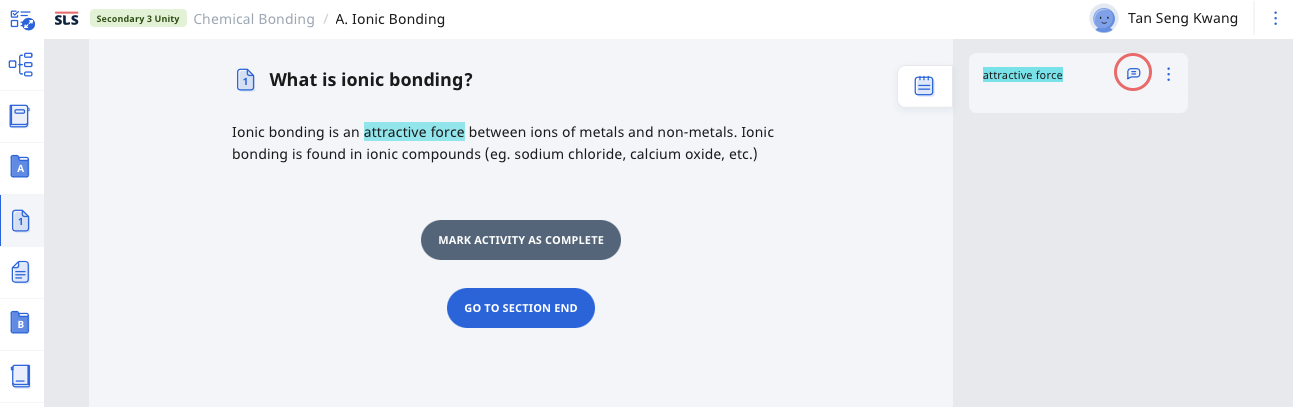
Notes will be visible in the Annotation Drawer. By default, the Annotation Drawer will be closed. Click the Notepad icon to Expand Drawer, Hide Drawer or Create Notes.
Clicking the Annotation cards will direct you to the respective Annotations on the current page.
If there are annotations to multiple components of the module, users can choose to collapse or expand all annotations.
Click on the Annotation card to view the corresponding highlighted component in the activity or module.
For activities or quizzes with multiple pages, the annotations will be divided by pages in the annotation drawer.
To view the annotations, click on the respective pages. Clicking on the Annotation cards will bring you to where you have created your annotation.
Note:
By default, you can add comments to any Annotation card. If you have shared your assignment with a peer, they will be able to leave comments.
When adding comments, you can mention your teacher(s) in your post by typing '@' and selecting their names from the dropdown list. The selected teacher(s) will be notified.
Editing and Deleting Annotation
You may edit each Annotation card from the Annotation Drawer by clicking the Overflow (3-dot icon) and selecting the following options:
Edit
Delete
Comment On/Off
You may also click on the Comments icon to open the Card Details to view the full text or image in an Annotation card and add a Comment.
E-Dictionary in Annotation
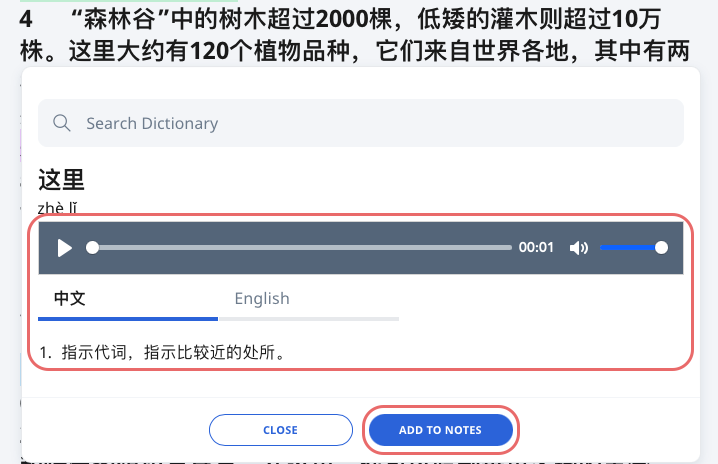
For Chinese and Tamil Assignments and Resources with the E-Dictionary enabled, you will be able to highlight text to find its meaning in the E-Dictionary.
Upon selecting the E-Dictionary icon , students can view the meaning of the word (with English translation, if enabled);
Listen to the pronunciation;
Add what you have searched to the right drawer as Notes. This creates an easy point of reference to revisit the meaning of the word in future.