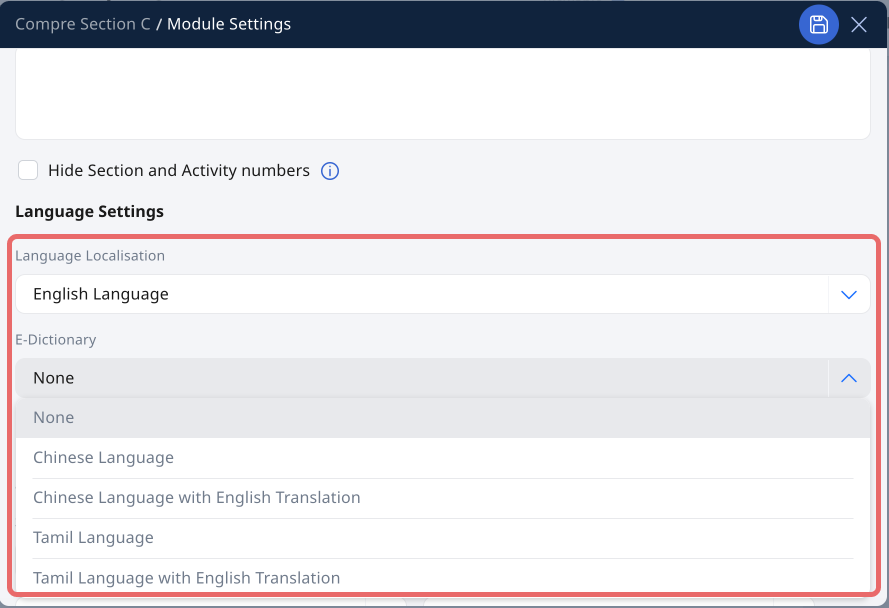
(A3,14) Localisation and E–Dictionary
Enable MTL Localisation and the E-Dictionary in your Module Settings to give students a richer language learning experience, including translated instructions and in-text word definitions.
(A3,14) Localisation and E-Dictionary
Important: The Tamil E-Dictionary is now available as an enhancement to MTL Localisation.
To create a more immersive MTL experience for your Modules, you can Enable MTL Localisation and E-Dictionary.
When Language Localisation is changed, the instructions on SLS will be in the language you have selected.
When the E-Dictionary feature is enabled, students will have an enhanced annotation feature. They may view the meaning of a selected word or phrase, and add their search results to the right drawer as Notes. Refer here for more information.
Enable MTL Localisation and E-Dictionary
In the Module Editor page, click on the Settings icon to access Module Details.
Click the dropdown under Language Localisation and E-Dictionary, and select the relevant option.
If there are no further changes, click on the Save icon .