(A1,1) Add a Topic
Learn how to add, edit, or delete a topic in your Class Group Forum.
(A1,1) Add a Topic
Create a Topic in Class Group Forum
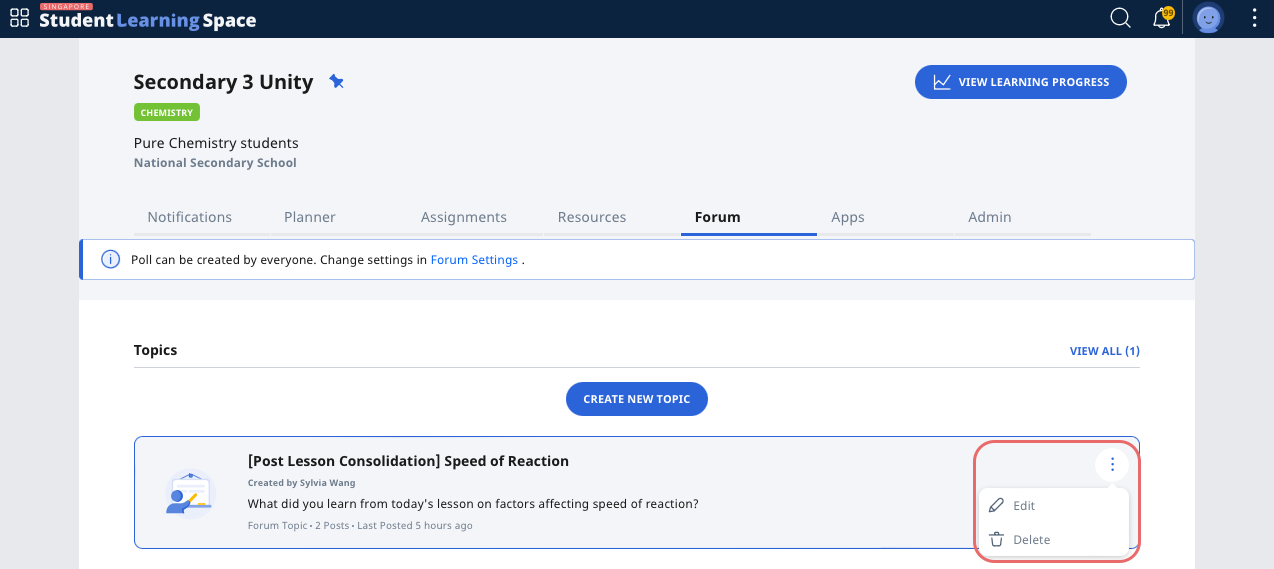
From a Class Group, click the Forum tab.
Click Create New Topic and enter the following fields:
Header
Featured Image (optional)
Body
Keyword Tags (optional)
You may also select the appropriate checkboxes at the bottom of the page for the following:
Grant Observers and students the permission to create posts
Allow upvoting of posts
Notify the class group about the Topic
Click Create to proceed.
To view all the topics, click View All (). The number in parenthesis shows you the total number of topics you have created for a particular class group.
Edit or Delete a Topic from Class Group Forum
Only teachers can edit and/or delete a Topic card.
To edit a Topic, click the Overflow (3-dot icon) and select Edit to edit the Header, Feature Image, Body, and Keyword Tags, enable notifications to the class group, or grant Observers and students the permission to create posts. Click Save to confirm.
To delete a Topic, click the Overflow (3-dot icon) and select Delete. Click OK in the pop-up message to confirm.