
(A2,1) Monitor Students' Responses in an Assignment
Learn how to track your students' assignment progress, view responses, and download results using the Monitor Assignment page.
(A2,1) Monitor Students' Responses in an Assignment
Monitor an Assignment
You can monitor your students' Assignment progress on the Monitor Assignment page via 3 ways:

From the Assignment card, click the Monitoring icon.
From within the Assignment, click the Monitoring icon in the header.
From the Module Plan, click the Monitoring icon.
Note: You can click Refresh at the top left corner of the Monitor Assignment page to view the most up-to-date student submissions.
Monitor Assignment page
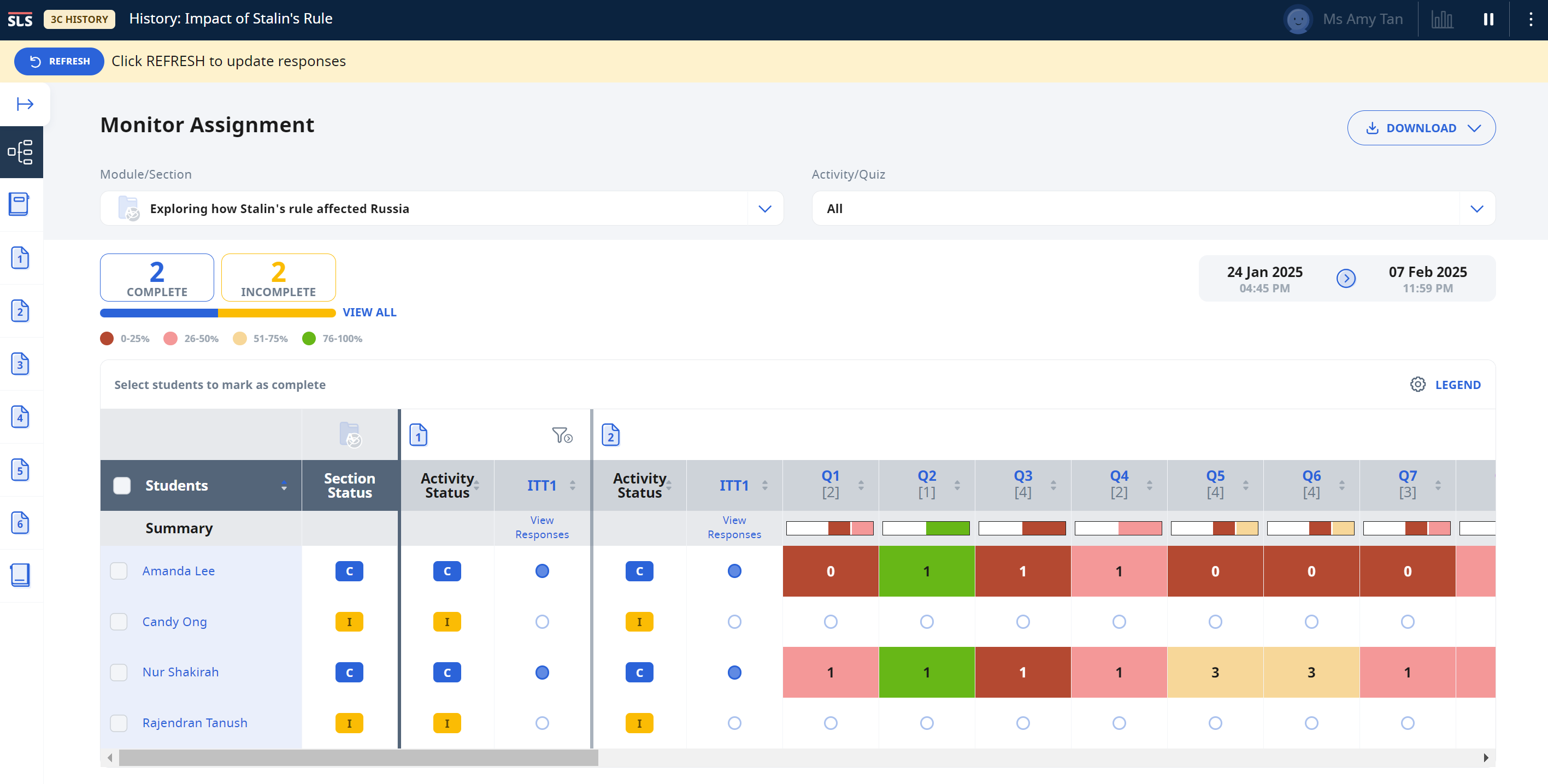
The following information will be displayed on the Monitor Assignment page:
Assignment Status: based on the overall Completion Status of students assigned.
Download button: You may choose to download the students’ marks or responses as a CSV file. You will be able to see their individual and aggregated marks or responses for each questions.
Note:
To download students’ response for each question, click on the question number to view the aggregated students’ responses for that particular question. From there, click Download Responses below the question stem.
Marks generated by Learning Feedback Assistants will be included in the total marks as well.
You can download Assignment Marks and Response .csv files from Assignment listing.
Filter: To filter by Student's Assignment, Section and Activity completion status. Click the Filter icon to open the Activities in the Section.

Toggle on/off to show marks under Setting: To show/hide marks on the Heatmap.
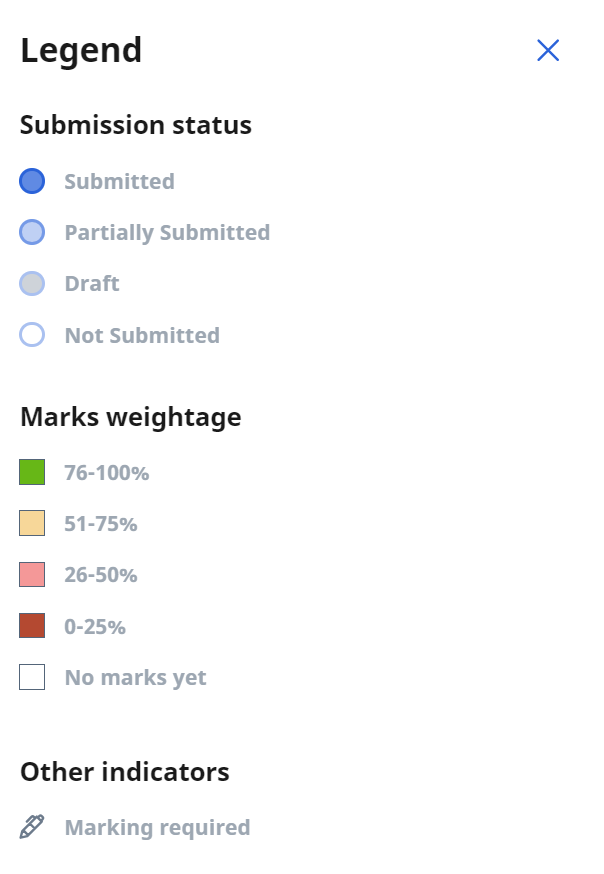
Legend: Legend for the colours and icons used in the Heatmap.

Heatmap: Table of students and their response data. All questions will be indicated in this table. Click the Section icon to navigate to a Section.

Within a Section, click the Activity icon to navigate to an Activity.


Team Quizzes will be indicated with the Team icon.

Alternatively, click the Filter icon beside a Section or Activity icon to filter a Section or an Activity. Within an Activity, click the Question Number in the table header to view the aggregated students' responses for that particular question.

Note:
You can view student responses by clicking View Responses or the visual indicator under the component on the heatmap.
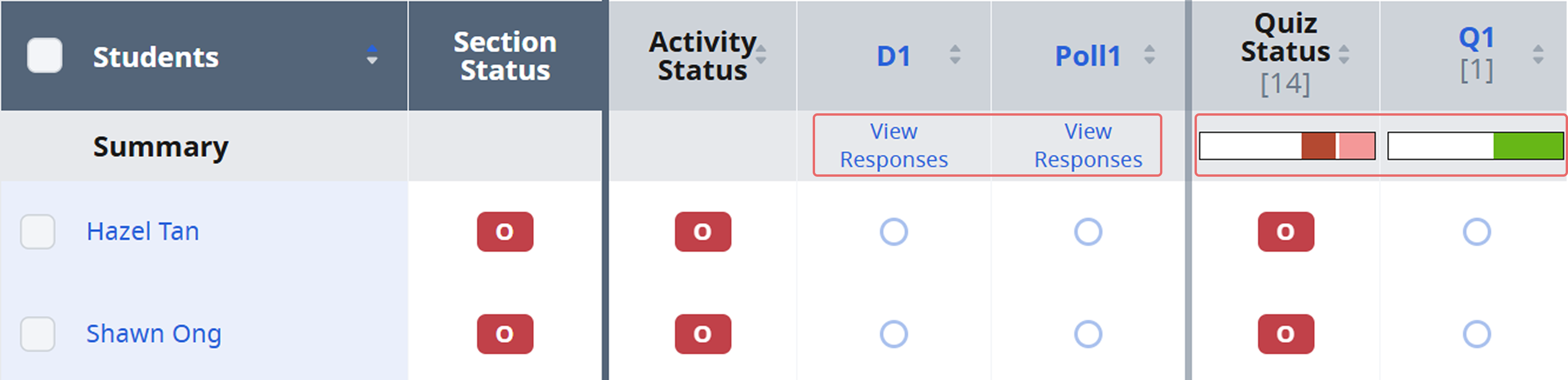
Clicking the Question Number on the Heatmap will redirect you to the Aggregated Student Responses.
To exit the filtered view, click the X beside the Filter icon.
Drawings, files, audio clips submitted to an Interactive Thinking Tool will not be downloaded.
You can view section start and due dates when filtering by sections on the heatmap. You can also click on the dates to access the Assignment Settings page and adjust the due dates.
Monitor Student Draft Responses
You can monitor your students’ draft responses in the following question types:
To view your students’ responses:
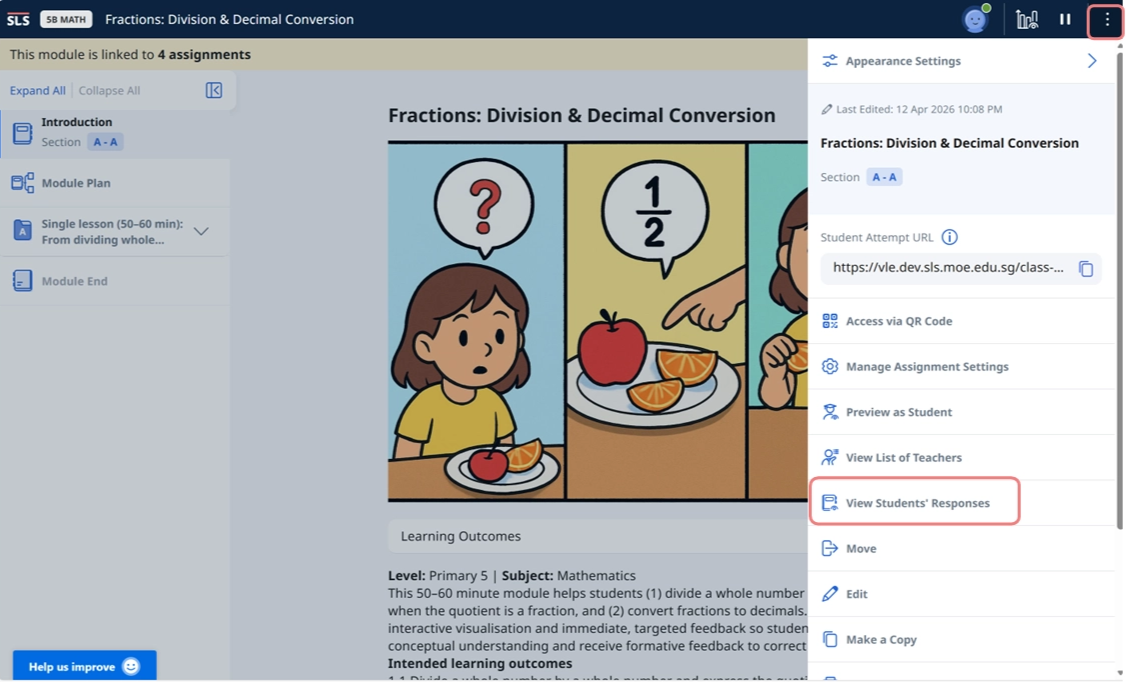
On the Monitor Assignment page, click the Overflow (three-dot) icon, then select View Students’ Responses. A full list of students’ names will be displayed for you to select a student, which will bring you to the individual student’s assignment.
From the Activity List on the left, select the Activity that contains the response(s).
You will be able to see the draft answer.
Note:
You cannot edit your students’ draft responses.
If the responses are in a quiz, you can submit them on your students’ behalf.
For draft answers, you will be able to see the name of the student or teacher who saved the draft and the time it was saved.
For submitted and unsubmitted answers, you will be able to see the name of the student or teacher who submitted/unsubmitted the answer and the time it was submitted/unsubmitted.
Monitor an Interactive Thinking Tool
Under the Interactive Thinking Tool, click View Class Submissions to open the Interaction Board.
For Interactive Thinking Tool, you can view responses for individual column or all the columns at once by choosing the View All tab.
You can click Refresh at the top left corner of the interaction board to view the most up-to-date student submissions.
Download the responses from the Interactive Thinking Tool by clicking Download Responses under either of the columns.
The number of Comments is indicated beside the Comment icon.

To view comments for any response, click the Response card.
All Comments made by you and your students will be made visible, arranged according to the time stamp, with the most recent post at the bottom. Changes to the state of the comments (e.g. deleted or edited) are also reflected in the Comments.
Note: Names of students who have left a comment cannot be hidden.
To comment on a response, click the Add on the bottom right of the Response card.
After typing in the comment, click Post.
You can bookmark an Interactive Thinking Tool card by clicking the Bookmark icon. This will allow you to filter the cards in the Interaction Board. Bookmarked cards will also be displayed first.

Monitor a Poll
Under the Poll, click View Class Submissions to open the Interaction Board.
The results of the Poll will be displayed as a bar graph. Hovering over the individual bar graph will show the number of votes for a particular option.
You can also view by individual student’s response by clicking the List icon next to View by.

The legend for the Poll is found below the bar chart.
Monitor a Discussion
Note: You may monitor students' submission status under the component in the heatmap.
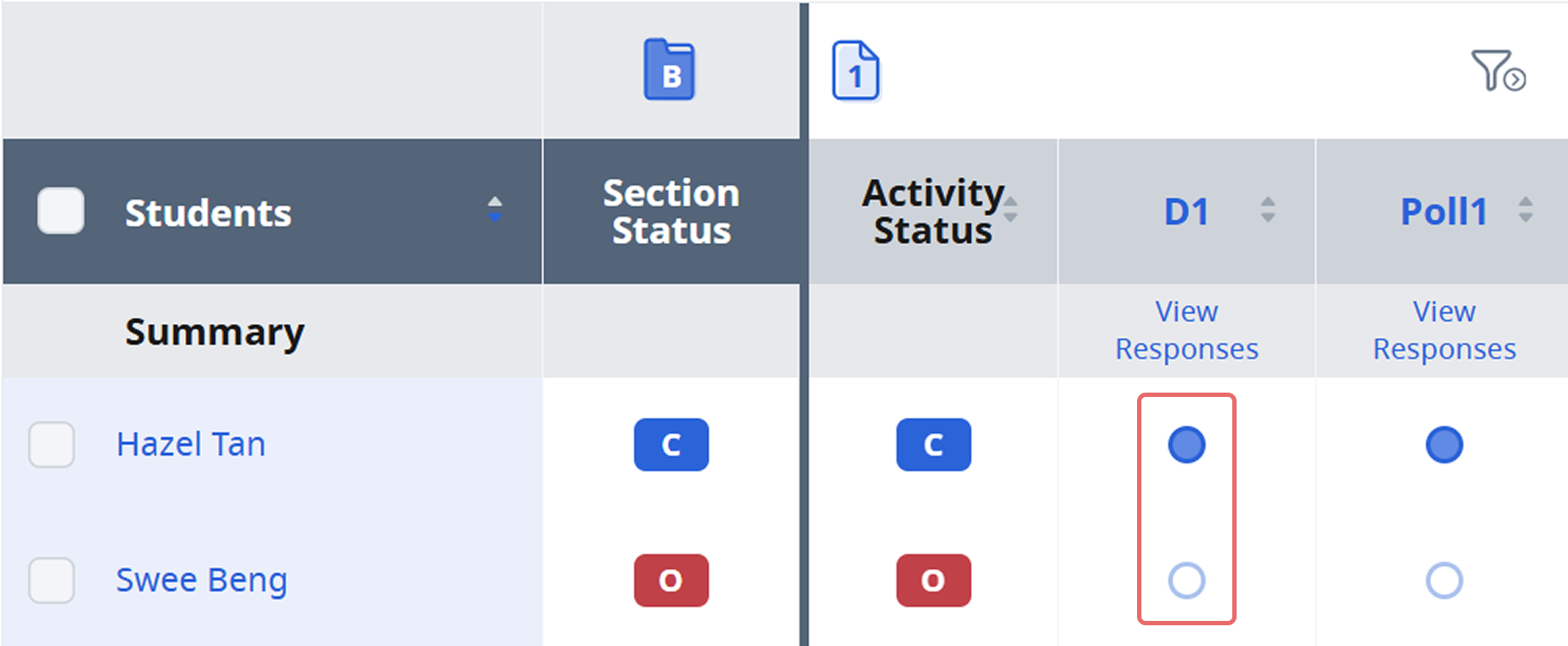
Under the Discussion, click View Class Submissions to open the Interaction Board.
You may click View Class Participation to monitor the number of posts submitted by each student.
You can click Refresh at the top left corner of the interaction board to view the most up-to-date student submissions.
Download the responses from the Discussion by clicking Download Responses.
You may also search for posts using the search bar above the posts.
You can respond to students’ responses by adding a post or adding comments to their posts.
The number of Comments is indicated beside the Comment icon.
To view comments for any response, click the Response card.
All comments made by you and your students will be made visible, and arranged according to the time stamp, with the most recent post at the bottom. Changes to the state of the comments (e.g. deleted or edited) are also reflected in the comments.
To comment on a response, click Add on the bottom right of the Response card.
After typing in the comment, click Post.
Note: Each student can submit more than one post in a Discussion and teachers can create new posts as well.
Monitor Linked Assignments
Following R4 (Jun 2026), teachers can monitor linked assignments via the enhanced monitoring dashboard. Each assignment will be linked to its respective Class Group and Subgroup or Form class, enabling more effective management of modules beyond class level.
Go to any Class Group that has been assigned a linked assignment. Open the assignment and click View Linked Assignments, which can be found below the monitoring icon.
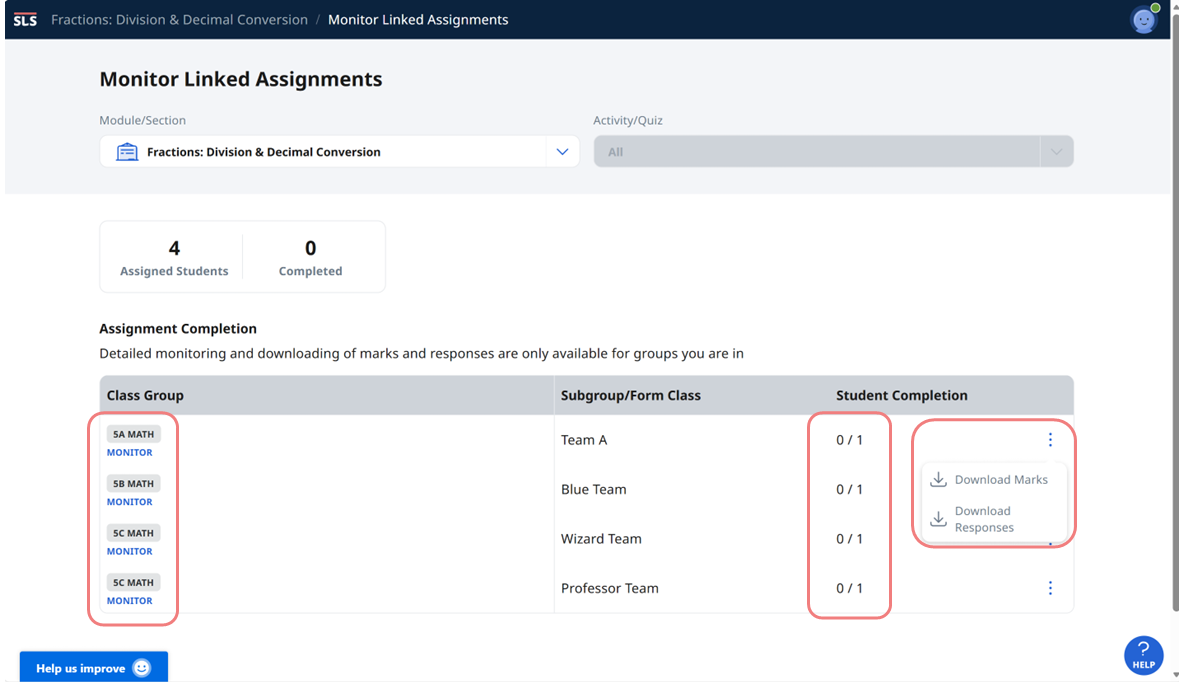
The monitoring dashboard displays the Class Groups and specific Subgroups or Form classes that have been assigned the module. Teachers can view the completion rate or click on the Overflow (3-dot icon) to download marks and responses. For more detailed monitoring of the assignment (e.g., providing feedback on students’ responses), click Monitor to access the individual Student Groups.
Video Tutorial
