
(B2) Embed Whitelisted Websites
Find and embed approved websites in SLS modules.
Embed Whitelisted Websites
Schools are advised to be mindful of the latest age advisories for whitelisted sites. Users can check the website description for advisories on the listed sites in SLS External Resources by clicking on the View Details icon.
When using sites with AI affordances, schools should refer to the MOE AIEd Implementation Guide and Checklist (opens in new tab) (requires access to MOE Intranet) for comprehensive guidelines.
Notes:
If you would like SLS to consider a website for whitelisting, please submit a request through the Website Whitelisting Form (opens in new tab). You can find out more about whitelisting here.
If you are unable to embed a website, the website may have been removed from whitelisting. Please email us at helpdesk@sls.ufinity.com if you encounter issues.
Embed Using Site URL
To embed a whitelisted website using site URL:
In Module Editor page, hover over Text/Media found within the Component Bar and select Website.
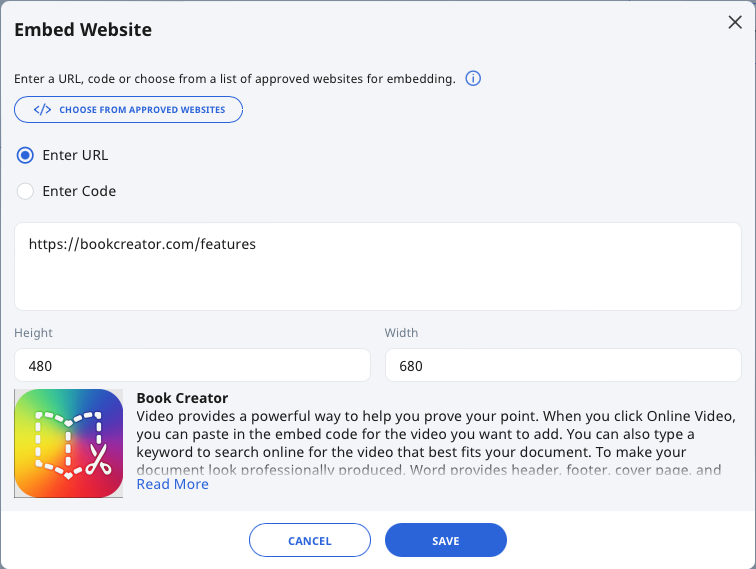
On the Embed Website subpage, select the radio button Enter URL and insert the URL in the text box.
Alternatively, click Choose From Approved Websites to search for and select a whitelisted website. Select the URL, followed by Choose to proceed.
The URL will be displayed in the text box.
You can adjust the Height and Width (in pixel) for the whitelisted website display.
Click Save to confirm.
Embed Using Code
To embed a whitelisted website using code:
In Module Editor page, hover over Text/Media found within the Component Bar and select Website.
On the Embed Website subpage, select the radio button Enter Code and insert the code in the text box. Some platforms provide embed code through their sharing features.
Alternatively, click Choose From Approved Websites to search for and select a whitelisted website. Select the code, followed by Choose to proceed.
The code will be displayed in the text box.
You can adjust the Height and Width (in pixel) for the whitelisted website display.
Click Save to confirm.